All teleprompter apps for Android do the same job: they scroll your script while you talk. But they differ in how they treat you while they do it.
Some are busy. They show ads, sometimes right when you want to record. Many push you to start a paid trial, or ask you to make an account. Some ask to send you notifications about their offers. Plenty make you accept cookies and tracking before you can even start. On top of that, they have lots of settings. Some people like that, but it takes time to learn.
Others are simple. Instead, they open straight to your script and get out of the way. No ads, no account, no tracking.
What to look for
- No ads, so nothing pops up while you record.
- No account, so you can start in seconds.
- No tracking. Before you install, check the data safety section on the app’s Google Play page.
- A small download, so it leaves room on your phone.
- A maker under strong privacy law, like the EU’s GDPR in Europe.
- Simple to understand settings, so you’re recording in under a minute.
The facts
The facts in the table come from each app’s own Google Play page, in the US store, read on 20 November 2026. The five other apps are the five most downloaded teleprompter apps for Android on Google Play that day. They are listed by downloads, biggest first, so Floaty comes last. When two apps have the same downloads, the one with more ratings comes first.
The data columns also come from Google Play: from the data safety section, which each developer fills in.
Do you make one of these apps, and is a fact wrong or out of date? Then write to info@be-it.no and we fix it.
Teleprompter apps for Android, side by side
| App | Maker | Downloads | Cost | Ads | Records in the app | Data shared with others | Data collected |
|---|---|---|---|---|---|---|---|
| BIGVU Teleprompter & Captions | BIGVU | 5M+ | Free, with in-app purchases + your data | None declared | Yes | Location, personal info, app activity, device or other IDs | Location, personal info, app activity, device or other IDs |
| Elegant Teleprompter | Ayman Elakwah | 5M+ | Free, with a separate paid Pro app + your data | Yes | No | None declared | App activity, app info and performance, device or other IDs |
| Teleprompter for Video | Teleprompter for Video Ltd | 1M+ | Free, with in-app purchases + your data | None declared | Yes | Personal info, financial info, files and docs, and 2 more | Personal info, photos and videos, files and docs, and 2 more |
| Teleprompter: Vlog & Scripts | Solid Labs Co., Ltd | 1M+ | Free, with in-app purchases | None declared | Yes | None declared | None declared |
| Teleprompter with Video Audio | Pode Groups | 1M+ | Free, with in-app purchases + your data | Yes | Yes | None declared | Personal info, photos and videos, files and docs, device or other IDs |
| Floaty: Script Teleprompter | beIT | 1K+ | Free, with in-app purchases | No | No | None declared | None declared |
“None declared” under Ads means the Play page had no “Contains ads” label that day.
A few words on each
BIGVU Teleprompter & Captions
An all-in-one video maker, so the teleprompter is only one part. Its Play page puts it next to AI editing, automatic subtitles and an AI script writer.
Elegant Teleprompter
Its Play page aims it at broadcasters, presentations and public speaking. The free app has ads and can open plain text files. However, a separate paid Pro app removes the ads and adds extra features.
Teleprompter for Video
Records you in the app while you read, with captions and a logo as Premium extras. However, its Play page says the free version only takes scripts up to 750 characters, about one minute of video.
Teleprompter: Vlog & Scripts
On your phone it is called Prompterpal. “Script. Read. Record.” Besides recording in the app, it imports PDF, TXT and Word files and keeps your scripts in the cloud. Its Play page mentions your full library on any device when signed in.
It asks you to start a 3-day free trial every time you open it. It also asks you to turn on notifications, to hear about promotions and app updates. Finally, the paid plans are weekly, yearly and lifetime.
Teleprompter with Video Audio
Records video with the front or back camera while the script scrolls next to the lens. It is free, but with ads and in-app purchases.
Simple Teleprompter Relaunched
Not in the table, because it is smaller: 10K+ downloads, made by Julian Schakib. Overall, a good one, if a plain full-screen teleprompter is what you need. It is free, with no ads and no in-app purchases, and its data safety section on Google Play declares no data collected or shared. You can also set the speed, font and colors, and mirror the text for a teleprompter glass. It fills the whole screen, so you can’t film yourself with it or use it on top of another app. If you just need text that scrolls, with no ads, it does the job.
Floatprompt: Teleprompter
Also not in the table: 500+ downloads, made by ShankarBros. On your phone it is called just “Teleprompter”. It shows ads. Besides that, its data safety section on Google Play says it shares your location, app activity and device IDs with other companies.
Floaty: Script Teleprompter
Our own app, and the smallest on the list. Above all, floating is what Floaty is built for. It’s the whole app, rather than an extra.
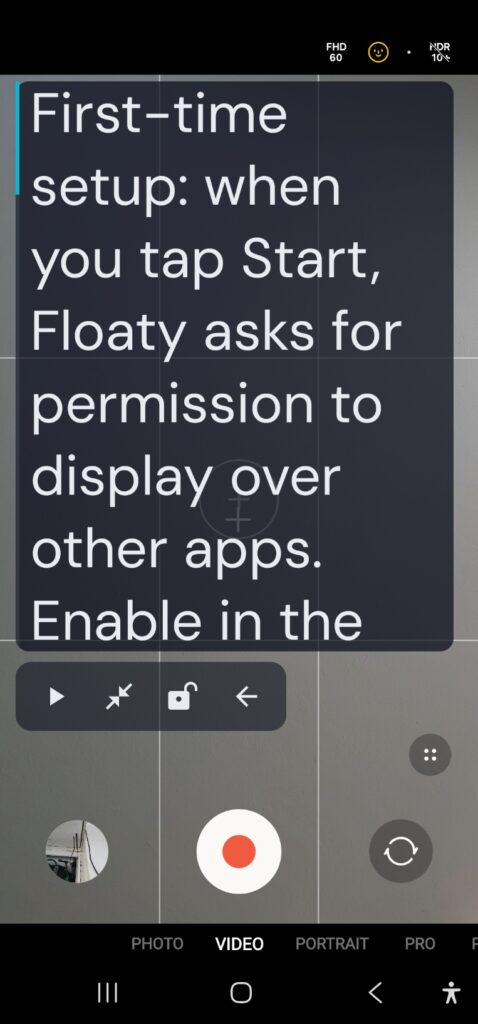
You paste your script and tap Start. Then the text floats on top of the camera app you already use: your phone’s own camera, TikTok, Instagram, YouTube or anything else. You record with the camera you know, at its full quality, and read while you look at the lens.
Most floating teleprompter apps take more setup and more steps before your script is on screen. In Floaty, by contrast, you paste, tap Start, and talk.
- Drag the text right under the front camera, so your eyes stay near the lens.
- Then set the scroll speed and the text size.
- Lock it in place, or shrink it to a small bubble and bring it back.
- Floating is part of the free version. In some apps, though, it’s part of a paid plan.
- No ads ever cover your script. No account, no tracking.
- A small download, about 1.3 MB. In 11 languages.
Free for scripts up to 1001 characters. Premium removes the limit and also adds a countdown you can set and sending text in from other apps. Still, Floaty does not record video itself, and it does not follow your voice.
How to choose
- Decide where you record. If you like your phone’s camera app, or you record in TikTok or Instagram, pick an app that floats over it. But if you want script, camera and editing in one app, pick one that records.
- Check the ads and the data. The table shows what each Play page says. The data safety section on Google Play has the details.
- Look at the free limit. Some free versions cap the script length. For example, a one-minute video is about 750 to 1000 characters.
- Try it for 30 seconds. First, put the text just under the front camera and set a slow speed. Then record a short test. Slow is better than fast, especially at first.
Common questions
What is a teleprompter app?
An app that scrolls your script on the phone screen, so you can read it while you look at the camera.
Can I use a teleprompter with my phone’s own camera app?
Yes, with a teleprompter that floats over other apps, like Floaty. The script sits on top of the camera app while you record.
Are teleprompter apps for Android free?
Most are free to install. However, some show ads, some limit the script length, and some keep features for paying users. The table shows what each Play page says.
Do I need an account?
It depends on the app, so check the data safety section on each Play page. It shows whether the app handles account data. Floaty, for example, needs no account.
About this page
This guide to teleprompter apps for Android is made by beIT in Bergen, Norway, the maker of Floaty. Facts were read from Google Play on 20 November 2026 and can change. We update the page when they do.
Made with ❤️ in Europe