If you shoot short form video on your own, you know the wall. Either you memorise the script, or you glance off camera at your notes and everyone watching can tell. Floaty: Script Teleprompter is a free Android app from beIT, a one person software studio in Bergen, Norway, and it takes a different route than most teleprompter apps. It does not replace your camera app. It floats on top of it.
Version 1.3.4 is out now with smoother handling at the free tier limit, a smaller download and the full interface translated into 11 languages. A good moment to introduce the app properly to anyone who has not tried it yet.
Why a floating teleprompter beats a full screen one
Most teleprompter apps on Android are full screen. To use one you have to record inside that app, which usually means giving up your phone’s real camera: no 4K, no HDR, no proper stabilisation, because you are no longer using the native camera pipeline.
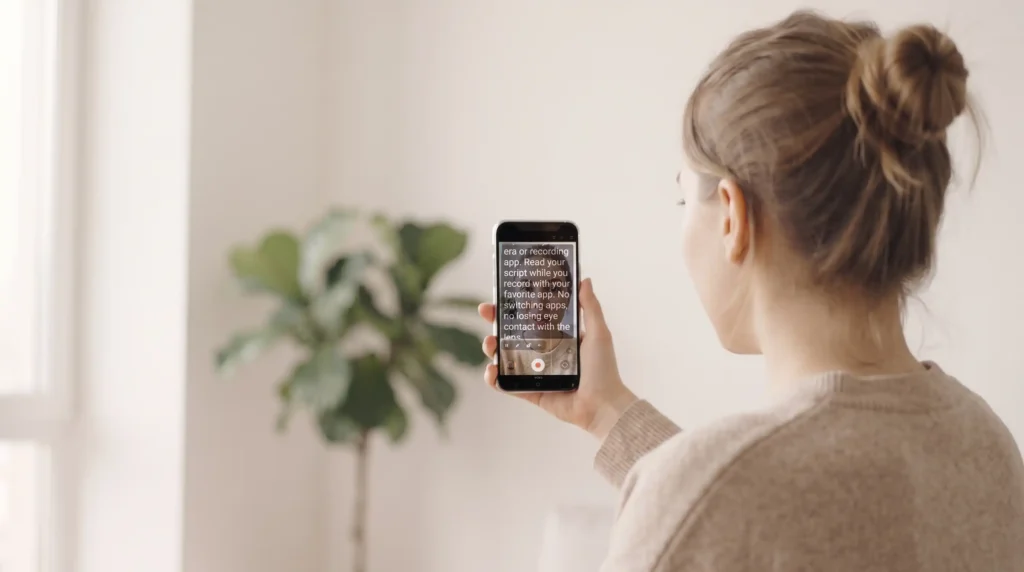
Floaty works the other way around. It is a small transparent overlay window, the same mechanism as a floating chat bubble, and it sits on top of whatever you already record with: TikTok’s own camera, Instagram, CapCut, or your phone’s native Camera app. You read the scrolling script through the overlay while your camera app does the actual filming, at its full normal quality. Floaty never touches the recording.
A teleprompter that works over your camera app, not instead of it.
What the free teleprompter app for creators includes
The free tier is not a trial that runs out. It is permanent, and it covers:
- The full floating overlay, over any app
- Adjustable scroll speed and font size
- Drag to reposition, lock mode, minimise to a small bubble
- A countdown before the scroll starts
- Scripts up to 1,001 characters
That character cap works out to roughly 160 to 180 words, about a minute of natural, unhurried speaking. For a typical TikTok or Reels script that is usually the whole video, start to finish, without paying for anything. If you write longer scripts regularly, Premium removes the cap, opens the full countdown range and adds share to app script import. It comes as a monthly subscription, a yearly one, or a single lifetime purchase.
What changed in version 1.3.4
- Fixed a cursor that could drift while you edited a script sitting right at the free tier limit
- Clearer messaging at the character cap: a paste over the limit is now refused with an explanation instead of silently, and delete works correctly at the cap
- Interface fully translated across 11 languages
- Added an open source licenses screen, so you can see what the app is built with
- Trimmed the download to roughly 1.34 MB
A teleprompter app with no login
No account, no sign up, no ads. The app has no internet permission at all, so it works completely offline and your scripts never leave your phone.
Install it from Google Play, grant the “Display over other apps” permission (Android asks once, that is what makes the overlay possible), paste or type your script, and press play over whatever camera app you already use.
Download Floaty: Script Teleprompter free on Google Play: play.google.com/store/apps/details?id=no.beit.floaty
More about the app, including the privacy policy, on the Floaty app page. Made with ❤️ in Europe.
Frequently asked questions
Is Floaty free to use?
Yes. The free tier is permanent, not a trial: the floating overlay, adjustable speed and font size, and scripts up to about 160 to 180 words, which is roughly a minute of natural speaking. A paid tier (monthly, yearly, or a one time lifetime purchase) removes the script length cap.
Does Floaty work with TikTok’s built in camera?
Yes. Floaty is a floating overlay, not a camera replacement, so it sits on top of TikTok, Instagram, CapCut or your phone’s native Camera app while you record normally inside whichever app you already use.
Does using Floaty reduce my video quality?
No. Floaty has no camera and no recording function of its own. Your existing camera app handles the actual recording at its normal quality, including 4K, HDR and stabilisation, whatever your phone and camera app support.
Do I need an account to use Floaty?
No. No login, no account and no ads. The app works fully offline and has no internet permission at all.
What languages does Floaty support?
The interface is fully translated into 11 languages: English, German, Spanish, French, Italian, Japanese, Korean, Norwegian, Brazilian Portuguese, Ukrainian and Traditional Chinese.